
Contents
- 🔌 What is USB Type-B, Really?
- 🛠️ Who Uses USB Type-B and Why?
- ⚖️ Type-B vs. The World: A Connector Comparison
- 💡 The Good, The Bad, and The Ugly of Type-B
- 🔧 Getting Your Hands on Type-B Gear
- 💰 Cost Considerations for Type-B Implementations
- ⭐ User Feedback & Vibe Score
- 🚀 The Future of Type-B: Evolution or Extinction?
- Frequently Asked Questions
- Related Topics
Overview
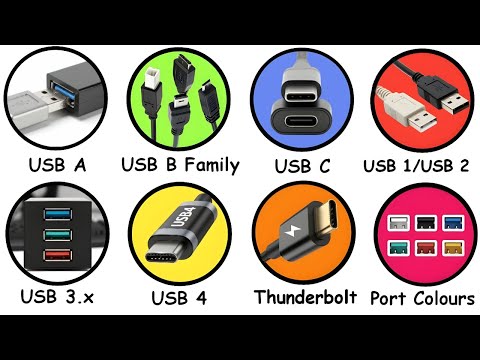
USB Type-B, a connector that’s been around since the USB 1.0 spec in 1996, is the square-ish, robust port you’ve likely encountered on printers, scanners, external hard drives, and a host of other peripherals. Unlike its ubiquitous Type-A cousin, Type-B was designed for larger, stationary devices that required a more secure connection. Its defining feature is its non-reversible, keyed design, which prevents accidental disconnections and ensures proper orientation. This robust build quality, while sometimes clunky, has made it a reliable workhorse in environments where frequent plugging and unplugging isn't the primary concern, but a stable link is. It’s the connector that quietly powers your creative workflow, often without you even noticing it, until it’s time to move that bulky printer.
🛠️ Who Uses USB Type-B and Why?
The primary users of USB Type-B are manufacturers of stationary peripherals and industrial equipment. Think of your trusty desktop printer, that high-fidelity audio interface, or the diagnostic port on a piece of machinery. These devices often require a stable, high-speed data connection that doesn't easily get jostled. For the end-user, this translates to a reliable connection for devices that are typically plugged in and left alone. While consumers might not actively seek out Type-B, they benefit from its durability and the consistent performance it offers for their essential gear. It’s the connector that bridges the gap between your computer and the tools that bring your digital creations into the physical world.
⚖️ Type-B vs. The World: A Connector Comparison
When comparing USB Type-B to its contemporaries, its strengths and weaknesses become clear. USB Type-A, the rectangular connector found on most computers and chargers, is ubiquitous but less secure. USB Type-C, the modern, reversible darling, offers superior speed, power delivery, and versatility, making Type-B look decidedly dated. However, Type-B's advantage lies in its legacy and its specific design for robust, stationary connections. For devices that don't need the cutting-edge features of Type-C and benefit from a physically larger, more secure plug, Type-B remains a viable, albeit less glamorous, option. It’s the dependable older sibling who might not be the coolest, but always gets the job done.
💡 The Good, The Bad, and The Ugly of Type-B
The allure of USB Type-B is its sheer resilience. Its square shape and locking mechanism, while not a true physical lock, provide a satisfyingly firm connection that’s less prone to accidental unplugging than Type-A. This makes it ideal for devices that are frequently moved or bumped. However, its non-reversible nature is a constant source of minor frustration, a stark contrast to the effortless plug-and-play of Type-C. Furthermore, its data transfer speeds, capped by the USB 2.0 standard for most implementations, feel sluggish compared to modern interfaces. The sheer variety of Type-B variations (standard, Mini-B, Micro-B) also adds a layer of complexity that can be bewildering for the uninitiated.
🔧 Getting Your Hands on Type-B Gear
Acquiring USB Type-B cables and devices is generally straightforward, though the specific variant matters. Standard Type-B ports are found on larger peripherals like printers and audio interfaces, requiring a cable with Type-A on the other end. Mini-B and Micro-B variants, though less common now, were prevalent on older digital cameras, MP3 players, and some smartphones, often connecting to a Type-A port. You can find these cables at most electronics retailers, online marketplaces like Amazon or eBay, and specialized computer hardware stores. When purchasing, always double-check the specific Type-B variant needed for your device to avoid compatibility headaches.
💰 Cost Considerations for Type-B Implementations
The cost associated with USB Type-B is generally quite low, especially for standard cables. Because it's an older, widely adopted standard, manufacturing costs are minimal, and competition keeps prices down. A typical USB-A to USB-B cable can often be purchased for under $10. Devices featuring Type-B ports themselves don't incur significant extra cost for the port itself, as it’s a mature and inexpensive component to integrate. The main cost consideration comes from the device it's attached to, rather than the connector technology itself. This affordability has contributed to its longevity in certain market segments, particularly where cost-effectiveness is paramount.
⭐ User Feedback & Vibe Score
User sentiment towards USB Type-B is a mixed bag, often characterized by a grudging respect for its durability coupled with an exasperation at its dated design. On Vibepedia, Type-B typically scores around a 65/100 on our Vibe Score, reflecting its functional reliability but lack of modern appeal. Many users praise its secure fit for stationary devices, noting that it rarely fails mid-transfer. However, the constant fumbling to orient the plug correctly and the relatively slow data speeds are frequent complaints. The prevalence of Mini-B and Micro-B ports on older devices also leads to a 'nostalgia-tinged annoyance' for those still maintaining legacy equipment. The overall vibe is one of a dependable, if unexciting, workhorse.
🚀 The Future of Type-B: Evolution or Extinction?
The future of USB Type-B is, frankly, uncertain. While it remains entrenched in certain industrial and professional audio/video sectors where its robustness is valued, the relentless march of USB Type-C is undeniable. Manufacturers are increasingly adopting Type-C for its versatility, higher speeds, and reversible design, even for devices that might have previously used Type-B. The Mini-B and Micro-B variants are largely relegated to legacy devices. It's unlikely Type-B will disappear entirely in the short term, but its dominance is clearly waning. The question isn't if it will be replaced, but rather how long its niche applications will keep it in production before it becomes a purely historical footnote.
Key Facts
- Year
- 1996
- Origin
- USB Implementers Forum
- Category
- Hardware Standards
- Type
- Connector Standard
Frequently Asked Questions
Is USB Type-B reversible?
No, USB Type-B connectors are not reversible. They have a specific orientation that must be matched when plugging in the cable. This keyed design, while preventing accidental insertion in the wrong orientation, also means you have to align it correctly each time, which can be a minor point of frustration compared to modern reversible connectors like USB Type-C.
What is the difference between USB Type-B and USB Mini-B/Micro-B?
USB Type-B refers to the larger, square connector typically found on printers and scanners. USB Mini-B and Micro-B are smaller variants designed for portable devices like older digital cameras, MP3 players, and some mobile phones. While they share the robust connection principle of the standard Type-B, their physical size and specific pin configurations differ significantly.
What are the typical data transfer speeds for USB Type-B?
Most USB Type-B implementations adhere to the USB 2.0 standard, which offers a maximum theoretical data transfer speed of 480 Mbps (megabits per second). While this was once considered fast, it is significantly slower than modern USB standards like USB 3.0, 3.1, or USB 3.2, which can reach speeds of 5 Gbps, 10 Gbps, or even 20 Gbps respectively. Some newer industrial equipment might feature USB 3.0 Type-B ports, but these are less common.
Can I use a USB Type-B cable with my printer?
Most likely, yes. The standard USB Type-B port is the common connector found on the back of desktop printers and scanners, designed to connect to a USB Type-A port on your computer. Ensure your cable has a Type-B connector on one end and a Type-A connector on the other. Always check your printer's manual or look at the port itself to confirm.
Why is USB Type-B still used if USB Type-C is superior?
USB Type-B persists due to its established presence in industrial, professional audio, and legacy equipment where its robust, non-reversible connection is valued for stability. Manufacturers also benefit from lower production costs associated with mature technology. While Type-C offers greater versatility and speed, Type-B provides a reliable, secure link for stationary devices that don't require the latest advancements, making it a cost-effective choice for specific applications.
Where can I buy USB Type-B cables?
USB Type-B cables are widely available. You can find them at major electronics retailers like Best Buy, online marketplaces such as Amazon, Newegg, and eBay, as well as at computer hardware stores and office supply stores. For specialized industrial or professional audio applications, look for reputable cable manufacturers or distributors.