
Contents
Overview
The necessity of backing up transaction data predates modern digital POS systems, with early businesses meticulously archiving paper sales ledgers. The advent of electronic cash registers in the mid-20th century, and later the integrated POS systems of the 1980s and 1990s, shifted this requirement to digital media. Early digital backups often involved magnetic tapes or floppy disks, prone to physical degradation and limited storage capacity. Companies like Oracle and IBM were early pioneers in enterprise data management, laying the groundwork for today's robust backup solutions. The evolution from manual ledger keeping to automated cloud backups reflects a broader trend in digital transformation across all industries.
⚙️ How It Works
Automated backup software, often integrated into the POS system or managed by a third-party service, schedules regular data dumps. These backups can be full (copying all data), incremental (copying only data changed since the last backup), or differential (copying data changed since the last full backup). Offsite storage can be a remote data center, a cloud service like AWS S3, or even a physically separate secure location, protecting against local disasters.
📊 Key Facts & Numbers
Key players in the POS data backup ecosystem include POS software providers like Square, Toast, and Revel Systems, who often build backup functionalities into their platforms. Dedicated backup and disaster recovery solution providers such as Veeam, Rubrik, and Commvault offer specialized services for businesses requiring more advanced protection. Cloud infrastructure giants like AWS, Microsoft Azure, and Google Cloud Platform provide the scalable storage and security necessary for offsite backups. Regulatory bodies like the PCI SSC also play a crucial role by setting standards for data security and transaction processing, indirectly influencing backup requirements.
👥 Key People & Organizations
The widespread adoption of cloud-based POS systems, inherently linked to robust backup protocols, has democratized access to sophisticated data management for small businesses that previously couldn't afford enterprise-level solutions. The integration of AI and machine learning is enhancing backup strategies by predicting potential hardware failures and optimizing backup schedules.
🌍 Cultural Impact & Influence
One of the primary controversies surrounding POS data backup is the balance between cost and comprehensive protection. Small businesses often struggle to afford enterprise-grade backup solutions, leading to potentially inadequate strategies. Another debate centers on data sovereignty and privacy: where is the backup data stored, who has access to it, and how is it protected from unauthorized access by third parties or even the cloud provider? The increasing reliance on third-party backup services also raises questions about vendor lock-in and the potential for service disruptions. The debate over the effectiveness of different backup types (full vs. incremental vs. differential) continues, with performance and storage efficiency being key considerations for businesses of all sizes.
⚡ Current State & Latest Developments
Expect to see greater integration of AI for predictive analytics, identifying potential data corruption or hardware failures before they occur.
🤔 Controversies & Debates
Practical applications of POS data backup are ubiquitous in retail, hospitality, and service industries. For a restaurant, it means recovering lost order histories, customer reservations, and menu pricing after a server crash, preventing significant revenue loss and operational paralysis. Retailers use backups to restore inventory counts, sales records, and customer loyalty data following a cyberattack, ensuring continuity of operations and maintaining customer trust. E-commerce platforms rely on these backups to ensure product listings, order fulfillment data, and payment histories are always accessible. Even small mobile vendors using tablet-based POS systems benefit from cloud backups, safeguarding their business data against device loss or damage. The ability to quickly restore data is paramount for maintaining customer satisfaction and business reputation.
🔮 Future Outlook & Predictions
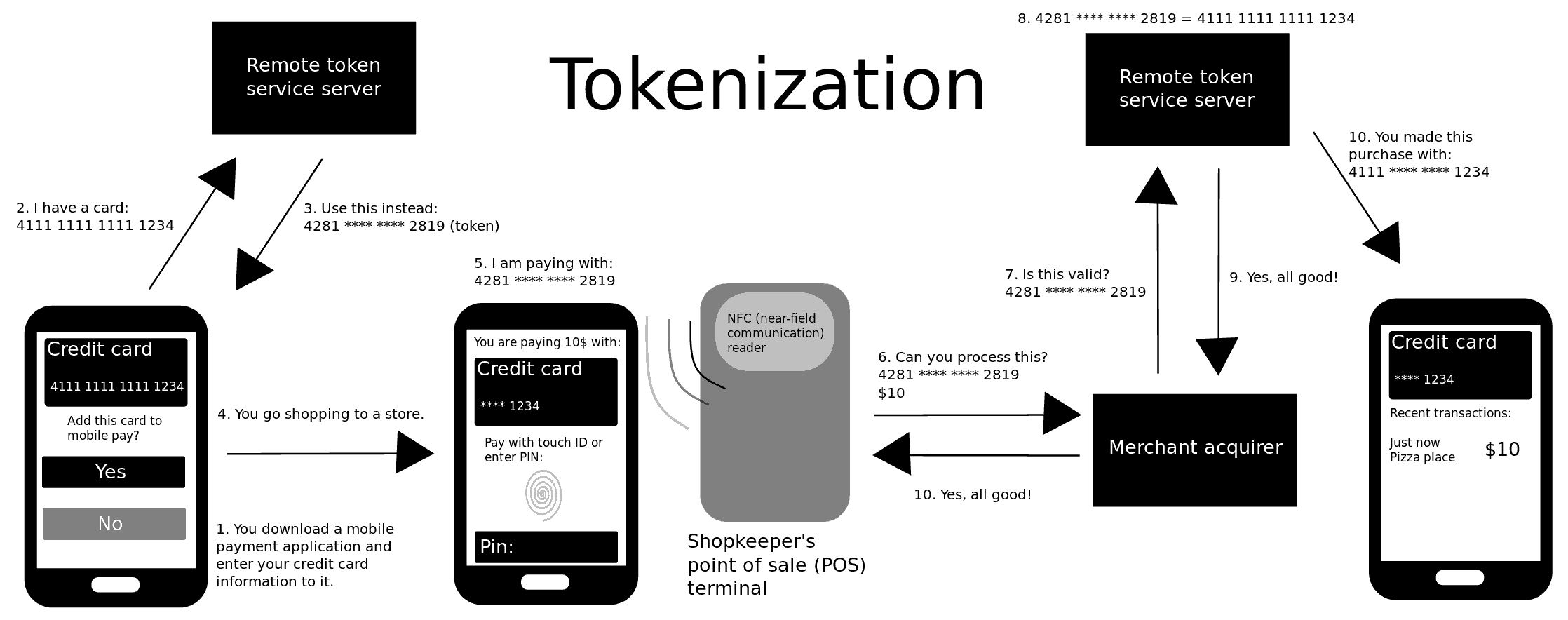
Understanding POS data backup is crucial for anyone involved in retail or service industries. It's intrinsically linked to data security principles, particularly tokenization for payment card data, which reduces the scope of data that needs to be backed up in its raw, sensitive form. For a deeper dive into data protection strategies, exploring disaster recovery planning is essential. Businesses should also familiarize themselves with relevant compliance fra
Key Facts
- Category
- technology
- Type
- topic