
Contents
Overview
Parental controls emerged as a response to the rapid expansion of digital media and internet access in households during the 1990s and 2000s. Early implementations included V-Chip technology for television content filtering, pioneered by the FCC and major broadcasters to comply with the Telecommunications Act of 1996. As personal computers, gaming consoles like PlayStation and Xbox, and mobile devices proliferated, tech companies including Microsoft, Apple, and Google developed increasingly sophisticated control systems. The evolution accelerated with the rise of smartphones and tablets, prompting platforms like YouTube, Instagram, TikTok, and Roblox to integrate family-focused safety features directly into their ecosystems. Today's parental controls represent a convergence of decades of child safety advocacy, regulatory pressure, and technological innovation.
⚙️ How Parental Controls Work
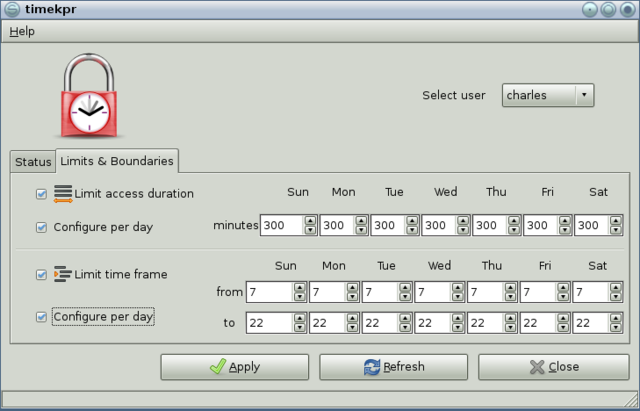
Parental controls function through four primary mechanisms that work independently or in combination. Content filtering blocks access to websites, apps, games, and media based on categories like violence, adult content, gambling, or social media—using AI-powered systems similar to those employed by Google Safe Search and YouTube Restricted Mode to categorize millions of digital resources. Screen time management allows parents to set daily or weekly usage limits, customize restrictions by app category (such as capping TikTok at two hours while allowing unlimited educational apps), and establish device bedtimes through platforms like Apple's Screen Time and Microsoft Family Safety. Activity monitoring tracks what children do online, showing browsing history, app usage patterns, search queries, and concerning keywords or behaviors that might indicate cyberbullying or predatory contact. Communication controls restrict who can contact children through messaging apps, gaming platforms, and social networks, while location tracking via GPS enables parents to monitor physical whereabouts—features available across Android Family Link, iOS, and gaming consoles.
🌍 Implementation Across Platforms
Implementation varies significantly across major technology platforms and ecosystems. Apple's iOS and iPadOS offer Screen Time with content restrictions, purchase approval, and location sharing integrated into the operating system; these controls sync across iPhones, iPads, and Apple Watches for comprehensive family management. Google's Family Link operates across Android devices, Chromebooks, and iOS, providing app management, content filters, screen time limits, and activity reports—with specialized controls for Google Play, Chrome, YouTube, and Google Search. Microsoft Family Safety extends across Windows PCs and Xbox consoles, offering web filtering, time limits, and detailed activity reporting that tracks gaming and app usage. Gaming-specific implementations include PlayStation Family Management for PS4 and PS5, which restricts communication, content, play time, and in-game spending; similar controls exist on Nintendo Switch and Xbox platforms. Individual apps like Instagram, Roblox, and Discord offer built-in safety settings including chat filters, privacy controls, and age-based content restrictions, while Meta's safety center coordinates features across Facebook, Instagram, and WhatsApp.
🔮 Future & Effectiveness
The effectiveness of parental controls continues to evolve as children become more tech-savvy and digital environments grow more complex. Research indicates that content filters work best for younger children (preteen and below) but become less effective as teens develop greater technical literacy and find workarounds—a challenge that platforms like Reddit, Discord, and 4chan present due to their decentralized, user-generated content nature. Security experts recommend a layered approach: starting with network-level controls through broadband and mobile providers, adding device-level restrictions via Apple, Google, or Microsoft systems, and finishing with app-specific settings on platforms children use daily. The future of parental controls likely involves more sophisticated AI detection systems capable of identifying harmful behavior patterns rather than just blocking categories, integration with emerging technologies like virtual reality and metaverse platforms, and greater transparency between parents and children about monitoring practices. Organizations like the NSPCC and Internet Matters emphasize that parental controls work best when combined with open communication, digital literacy education, and age-appropriate independence—treating technology management as an evolving conversation rather than a static restriction.
Key Facts
- Year
- 1996-present
- Origin
- United States (V-Chip technology); expanded globally with internet adoption
- Category
- technology
- Type
- technology
Frequently Asked Questions
What's the difference between device-level and app-level parental controls?
Device-level controls (like Apple Screen Time or Google Family Link) manage entire devices with features like screen time limits and app restrictions that apply system-wide. App-level controls operate within individual applications—for example, YouTube Restricted Mode, Instagram Sensitive Content Filter, or TikTok Family Pairing—allowing customization specific to each platform's content and features. Most experts recommend using both layers for comprehensive protection.
At what age do parental controls become less effective?
Content filters and basic restrictions typically work best for children under 12 (preteen age). As teens enter their early teens and develop greater technical literacy, they often find workarounds or use platforms designed to evade monitoring. Security researchers recommend transitioning from strict controls to open communication and digital literacy education around ages 13-14, while maintaining some monitoring of concerning behaviors or keywords.
Can parental controls track my child's location?
Yes, many parental control systems include GPS location tracking features. Google Family Link, Apple Screen Time, and most third-party parental control apps can show a child's physical location in real-time. However, this requires the child's device to have location services enabled and the parent to have set up location sharing permissions. Some parents use this for safety (knowing where their child is), while others consider it a privacy concern.
Do parental controls work on gaming consoles?
Yes. PlayStation offers Family Management for PS4 and PS5 with communication restrictions, content filtering, play time controls, and spending limits. Xbox and Nintendo Switch have similar systems. These console-specific controls complement device-level controls and are particularly important for managing online multiplayer communication and in-game purchases, which are common on platforms like Roblox and Fortnite.
What's the best approach to implementing parental controls?
Experts recommend a three-step layered approach: (1) Start with network-level controls through your broadband or mobile provider for baseline protection across all devices; (2) Add device-level controls via Apple, Google, or Microsoft systems to manage screen time and app access; (3) Finish with app-specific settings on platforms your child uses daily like YouTube, Instagram, and TikTok. Combine technical controls with open communication about online safety and age-appropriate digital literacy education.
References
- esafekids.com.au — /post/parental-controls
- security.org — /parental-controls/
- nspcc.org.uk — /keeping-children-safe/online-safety/parental-controls/
- safety.google — /intl/en_sg/settings/parental-controls/
- internetmatters.org — /parental-controls/
- youtube.com — /watch
- internetsafety101.org — /prevention/parentalcontrols/
- esafety.gov.au — /parents/issues-and-advice/parental-controls
- families.google — /parental-controls
- support.apple.com — /en-us/105121
- pcmag.com — /picks/the-best-parental-control-software
- allaboutcookies.org — /best-parental-control-apps
- techradar.com — /best/best-parental-control-app-of-year