Vibepedia

Operating Systems: The Digital Foundation | Vibepedia

Foundational Tech Ubiquitous Complex Systems
Operating Systems: The Digital Foundation | Vibepedia

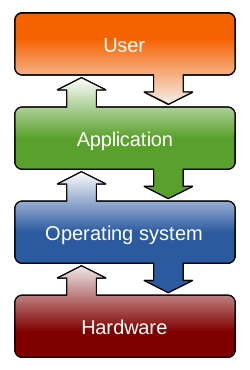
Operating Systems (OS) are the fundamental software that manages a computer's hardware and software resources, acting as the intermediary between users and…

Contents

  1. 💻 What Exactly Is an Operating System?
  2. 🛠️ Core Functions: The OS's Job Description
  3. 🚀 The Big Players: A Quick Market Overview
  4. ⚖️ Open Source vs. Proprietary: The Great Divide
  5. 📈 Vibe Score: The Cultural Energy of OSs
  6. 🤔 Choosing Your OS: Practical Considerations
  7. 💡 Historical Roots: Where Did It All Begin?
  8. 💥 The Future of OS: What's Next?
  9. ⭐ User Ratings & Community Buzz
  10. 💰 Licensing & Cost: What You'll Pay
  11. 🔗 Related Systems & Concepts
  12. ❓ Frequently Asked Questions
  13. Related Topics

Overview

Operating Systems (OS) are the fundamental software that manages a computer's hardware and software resources, acting as the intermediary between users and the machine. They dictate how programs run, how data is stored and accessed, and how peripherals communicate. Early OSs like CTSS (Compatible Time-Sharing System) in the 1960s laid the groundwork for modern multitasking, while the rise of Unix and later Windows and macOS defined personal computing. Today, OSs range from embedded systems in IoT devices to massive distributed systems powering cloud infrastructure, each with unique design philosophies and performance trade-offs. Understanding the OS is crucial for anyone seeking to grasp the inner workings of digital technology.

💻 What Exactly Is an Operating System?

An OS is the fundamental software that acts as the intermediary between your computer's hardware and the applications you run. Think of it as the conductor of an orchestra, coordinating everything from the CPU's processing power to the memory allocation, ensuring that each component works harmoniously. Without an OS, your hardware would be a collection of inert components, incapable of executing even the simplest command. It's the bedrock upon which all your digital experiences are built, from browsing the web to running complex simulations.

🛠️ Core Functions: The OS's Job Description

At its heart, an OS performs several critical tasks: Process Management (deciding which programs get to use the CPU and when), Memory Management (allocating RAM efficiently), File System Management (organizing and accessing data on storage devices), and Device Management (handling input/output operations for peripherals like printers and keyboards). It also provides a UI—whether graphical or command-line—allowing you to interact with the machine. These functions are non-negotiable for any functional computing device.

🚀 The Big Players: A Quick Market Overview

The OS market is dominated by a few giants. Microsoft Windows holds the lion's share of the desktop and laptop market, a position it's maintained for decades. On mobile, Google's Android reigns supreme, powering the vast majority of smartphones globally, while Apple's iOS is the exclusive OS for iPhones and iPads. For servers and supercomputers, Linux distributions are the undisputed champions, prized for their flexibility and robustness. Each has carved out its niche through distinct design philosophies and market strategies.

⚖️ Open Source vs. Proprietary: The Great Divide

The choice between Open Source Operating Systems like Linux and proprietary systems like Windows or macOS is a significant one. Open source offers unparalleled transparency, customization, and often, a lower cost of entry, fostering vibrant developer communities. Proprietary systems, on the other hand, typically provide a more polished, integrated user experience and dedicated commercial support, though at a price. This fundamental difference impacts everything from security patching to long-term development direction.

📈 Vibe Score: The Cultural Energy of OSs

The Vibe Score for operating systems is complex, reflecting deep-seated user loyalty and technical preferences. Linux often scores high among developers and tech enthusiasts for its freedom and power (Vibe Score: 85/100), while macOS appeals to creatives and those valuing design and ease of use (Vibe Score: 78/100). Windows maintains broad appeal due to its ubiquity and software compatibility (Vibe Score: 70/100), and Android dominates the mobile space with its open ecosystem (Vibe Score: 75/100). These scores fluctuate based on new releases and emerging trends.

🤔 Choosing Your OS: Practical Considerations

Selecting an OS depends heavily on your intended use. For gaming and general productivity, Windows remains the default choice due to its extensive software and hardware support. If you're in creative fields or prefer a streamlined, secure environment, macOS is a strong contender. Developers, system administrators, and those prioritizing control and customization will find Linux distributions like Ubuntu or Fedora exceptionally powerful. For mobile, the choice is largely between the ecosystem of iOS and the flexibility of Android.

💡 Historical Roots: Where Did It All Begin?

The concept of an OS evolved from early batch processing systems in the 1950s, like GM-NAA I/O, to interactive time-sharing systems in the 1960s. UNIX, developed at Bell Labs in the late 1960s and early 1970s by Ken Thompson and Dennis Ritchie, was a watershed moment, introducing key concepts like hierarchical file systems and command-line interpreters that still influence modern OS design. The rise of personal computers in the late 1970s and early 1980s, with systems like CP/M and later MS-DOS, brought OSs to the masses.

💥 The Future of OS: What's Next?

The future of operating systems points towards increased integration, enhanced security, and greater abstraction. We're seeing a move towards cloud-native OS concepts, where core functionalities are delivered as services, and a growing emphasis on containerization and microservices architectures. AI will undoubtedly play a larger role in OS optimization and user interaction. The ongoing battle between open and closed ecosystems, and the rise of specialized OSs for IoT devices, will continue to shape the landscape.

⭐ User Ratings & Community Buzz

User sentiment varies wildly. Windows users often praise its familiarity and vast software library, though complaints about updates and performance issues are common. macOS users rave about its stability and aesthetic, but lament its higher cost and limited hardware options. Linux users celebrate its power and freedom, but acknowledge a steeper learning curve for newcomers. Android users appreciate its customization, while iOS users value its simplicity and ecosystem integration. Community forums and review sites offer a constant stream of user feedback.

💰 Licensing & Cost: What You'll Pay

The cost of operating systems ranges from free to substantial. Linux distributions are almost universally free, supported by community contributions and optional enterprise support packages. Windows typically comes pre-installed on new PCs, with the cost baked into the hardware price; standalone licenses can range from $100 to $400. macOS is exclusively bundled with Apple hardware, meaning its cost is inseparable from the premium price of Macs. Android is free for manufacturers, but app ecosystems and services often involve in-app purchases or subscriptions.

❓ Frequently Asked Questions

Q: What's the difference between an OS and a BIOS/UEFI? A: The BIOS (Basic Input/Output System) or UEFI (Unified Extensible Firmware Interface) is firmware that initializes your hardware when you turn on your computer. It's the very first software that runs, responsible for booting the OS. The OS then takes over, managing all hardware and software resources. Think of BIOS/UEFI as the ignition system for your car, and the OS as the engine and all its supporting systems.

Q: Can I run multiple operating systems on one computer? A: Absolutely. This is commonly achieved through dual-booting, where you install two or more OSs on separate partitions and choose which one to load at startup. Alternatively, virtualization software like VMware or VirtualBox allows you to run an OS within another OS as a virtual machine, offering more flexibility and easier switching.

Q: How often should I update my operating system? A: It's generally recommended to keep your OS updated regularly. Updates often include critical security patches that protect against new vulnerabilities, as well as performance improvements and new features. Most modern OSs offer automatic updates, which are usually safe to enable, though it's wise to back up important data before major version upgrades.

Q: What is a 'kernel' in an operating system? A: The kernel is the core component of an OS, acting as the central manager of the system. It handles the most fundamental tasks, such as process scheduling, memory management, and communication between hardware and software. It's the bridge between applications and the actual hardware, and its efficiency and stability are paramount to the overall performance of the OS.

Q: Are there operating systems for devices other than computers and phones? A: Yes, operating systems are ubiquitous. Embedded operating systems run on a vast array of devices, including smart TVs, routers, cars, industrial control systems, and the IoT devices. These OSs are often highly specialized, optimized for low power consumption, real-time performance, or specific hardware functionalities.

Key Facts

Year
1950
Origin
MIT (early time-sharing systems)
Category
Computer Science
Type
Topic