
Contents
Overview
Tabbed browsing is a user interface paradigm that allows users to open and manage multiple web pages or documents within a single application window, each accessible via a clickable 'tab'. This innovation, widely popularized by web browsers, transformed the user experience from a chaotic series of overlapping windows into an organized, navigable space. Originating from the physical metaphor of file folder tabs, it dramatically improved efficiency and reduced digital clutter, becoming a near-ubiquitous feature across operating systems and applications. Its adoption by major browsers cemented its place as a fundamental aspect of modern computing, influencing everything from text editors to complex software suites.
🎵 Origins & History
The conceptual ancestor of tabbed browsing lies in the physical world: the tabs adorning file folders and card indexes, designed to quickly identify and access different documents. In the digital realm, early attempts at managing multiple open items often involved cumbersome overlapping windows, a problem that plagued early graphical user interfaces. While the exact inventor is debated, the concept began to gain traction. Major browsers like Netscape Navigator and later Internet Explorer eventually adopted tabbed browsing, with Internet Explorer version 8 being released in 2008. This feature rapidly became standard, influenced by competitive pressure from Mozilla Firefox and Google Chrome.
⚙️ How It Works
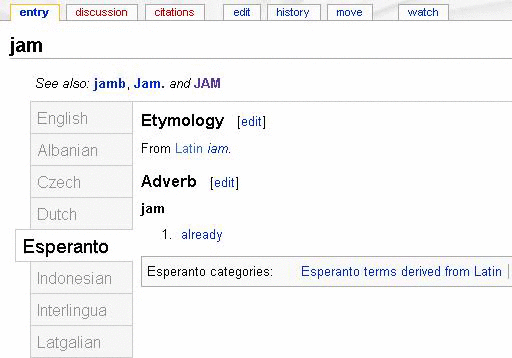
Tabbed browsing functions by presenting a series of clickable labels, or 'tabs,' typically arranged horizontally at the top of a window. Each tab represents a distinct document or web page loaded within the application. Clicking a tab brings its associated content to the forefront, while the previously active tab is sent to the background. This mechanism allows users to switch between multiple states or pages without the need to open or close separate windows, which can consume significant screen real estate and system resources. Modern implementations often include features like tab grouping, drag-and-drop reordering, and the ability to restore recently closed tabs, further enhancing user control and workflow.
📊 Key Facts & Numbers
The average user reportedly has 10-15 tabs open at any given time. Today, it's estimated that over 95% of web browsing sessions utilize tabs. Studies have shown that tabbed interfaces can reduce task completion times by up to 20% compared to managing multiple windows.
👥 Key People & Organizations
While the precise origin is murky, key figures and organizations propelled tabbed browsing into ubiquency. Marc Andreessen, co-founder of Netscape Communications Corporation, was instrumental in the early adoption of graphical web browsing features that paved the way. Jonas Salling and the Opera Software team were pioneers in refining the tabbed interface for web browsers, making it a central part of their user experience. Brendan Eich, creator of JavaScript, also contributed to the dynamic web environments where tabs thrive. Google's development of Chrome under the leadership of Sundar Pichai further optimized tab performance and management, setting new industry standards.
🌍 Cultural Impact & Influence
Tabbed browsing has fundamentally reshaped how individuals interact with digital information. It transformed the web from a series of discrete pages into a more integrated, navigable space, akin to flipping through a magazine. This shift has had profound implications for information consumption, online research, and multitasking. The visual metaphor of tabs has also permeated other software interfaces, from text editors like Visual Studio Code to system preference panes, demonstrating its widespread influence on user interface design principles and user expectations for managing complex information environments.
⚡ Current State & Latest Developments
In 2024, tabbed browsing remains the dominant paradigm for managing multiple web pages. Innovations continue, focusing on performance optimization, memory management for large numbers of tabs (a persistent challenge for browsers like Chrome and Microsoft Edge), and enhanced organization features. AI-powered tab management, such as automatic grouping or suggesting relevant tabs, is an emerging area. The ongoing battle for browser market share, primarily between Google Chrome, Apple Safari, Mozilla Firefox, and Microsoft Edge, ensures continuous refinement of tabbed interfaces to improve user efficiency and engagement.
🤔 Controversies & Debates
The primary controversy surrounding tabbed browsing centers on resource consumption. Opening dozens of tabs, especially on complex websites, can consume significant amounts of RAM and CPU, leading to slower performance and battery drain, particularly on mobile devices. Critics argue that the ease of opening tabs encourages information overload and distraction. Furthermore, the implementation of tab management features can vary significantly between browsers, leading to debates about which approach is most user-friendly and efficient. Some users also express concern over privacy implications related to how browser history and active tabs are managed by browser vendors.
🔮 Future Outlook & Predictions
The future of tabbed browsing likely involves deeper integration with AI and more sophisticated resource management. Expect to see browsers automatically suspending inactive tabs to save memory, intelligent tab suggestions based on user behavior, and improved cross-device tab synchronization. Vertical tabs, gaining popularity on Edge and Chrome extensions, may become a more mainstream option for users with wide monitors. The line between browser tabs and application windows may also blur further with the rise of progressive web apps (PWAs) and more integrated desktop environments, potentially leading to new forms of tabbed or panel-based interfaces.
💡 Practical Applications
Tabbed browsing is not confined to web browsers. It's a core feature in many desktop applications, including text editors like Sublime Text and Atom, IDEs like Visual Studio Code, and system preference panels across macOS and Windows. In software development, it allows developers to manage multiple code files, configuration settings, and debugging sessions efficiently. For general users, it's essential for comparing products online, researching topics, managing email clients, and keeping multiple communication channels open simultaneously.
Section 11
Web browser
Section 12
User interface design
Section 13
Multitasking
Section 14
Information architecture
Section 15
Desktop metaphor
Section 16
Netscape Navigator
Section 17
Mozilla Firefox
Key Facts
- Category
- technology
- Type
- concept